# Flow Step: Call
The Call step is used to forward a call to one or more phone number or SIP URIs.
## Configuration
Field | Description
--|--
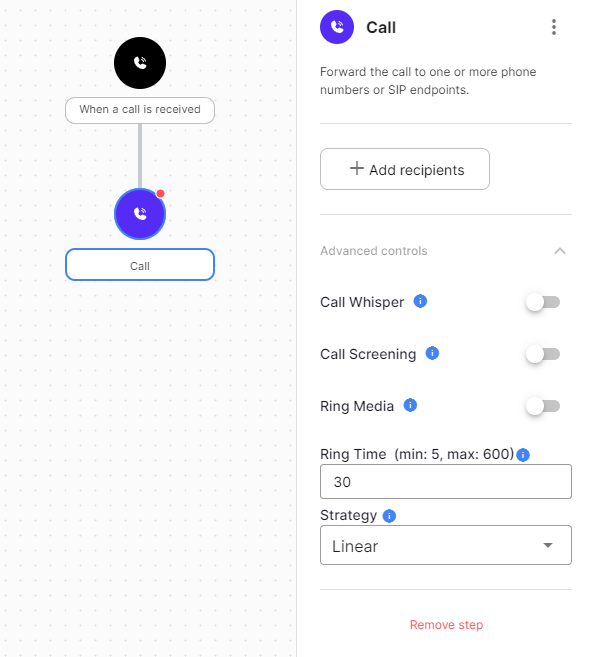
Recipients | The phone number or SIP URI you want to forward a call to. These are sortable by clicking and dragging them up and down in the list they appear in. At least one recipient needs to be defined on a Call step for the step to be valid.
Call Whisper | Audio that is played to the recipient(s) when answered, before they are connected to the caller.
Call Screening | Audio that is played to the recipient(s) when answered, instructing them to press 1 to accept the call. This allows the recipients to accept or reject a call without the caller knowing.
Ring Media | Audio or music that is played to the caller instead of ringing.
Ring Time | The amount of time the call will ring before timing out.
Strategy | Determines the order that recipients will be used when forwarding a call.
**Linear**: Calls the recipients in order
**Random**: Calls a single random recipient
**Random All**: Calls all recipients in a random order
**Simultaneous**: Calls all recipients at the same time
## Exits
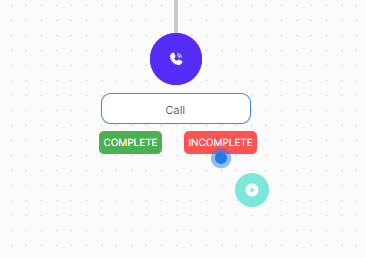
Users can add additional steps after a Call step based on the whether it was complete or incomplete. To do this simply drag a step to the desired dropzone. E.g see below example of the named dropzones for the Call step.
Type | Description
--|--
Complete | A Call step is considered complete if one of the recipients have been connected and answered.
Incomplete | A Call step is considered incomplete if the call has been rejected, not answered, is busy or has failed in any other way.